
Time and attendance, straight into payroll.
Time and attendance serving Long Island, New York, New Jersey and beyond.
Employees clock in and out and request time off. Administrators approve time and manage schedules. Hours flow from the clock straight into payroll, with no re-keying.
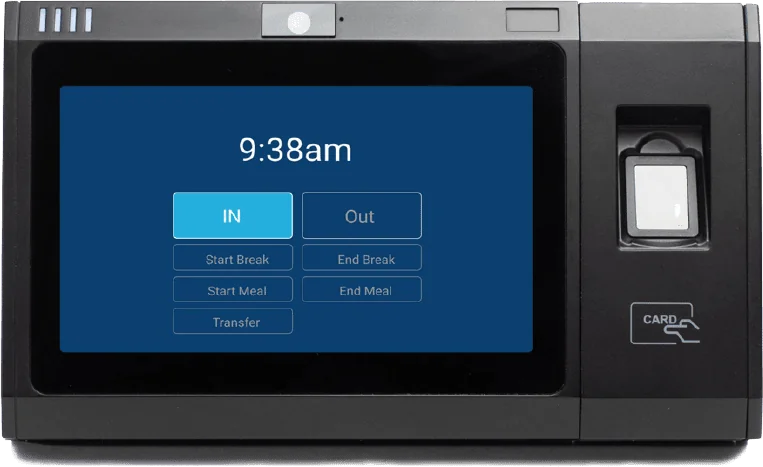 Optional biometric clock-inRFID badge clock-in
Synced with payroll, one employee record.
One set of hours runs payroll, job costing and reporting, so the numbers always match, from a single Long Island location to teams across New York and New Jersey.
- New hires onboarded in payroll appear in time and attendance automatically, with no double entry
- Approved hours pull straight into payroll, with no re-keying
- One system and one employee record for time and payroll
- Time off and accruals carried into payroll
- Hours feed job costing from the same data
- Part of full service payroll
Good fit if you have…
- A time-keeping system that should feed payroll
- Several pay rates, shifts or pay schedules
- Multiple departments or locations
Clock in on a phone, the web, or a time clock.
Employees clock in and out the way that fits your workplace, and every punch flows into payroll.
On their phone
Employees clock in and out from their phone, handy for staff who start on the road or at a job site.
On the web
Employees clock in and out from any computer browser.
At a time clock
Use a physical time clock at your location. Employees tap an RFID badge or use optional fingerprint clock-in.
Clock into the right job, project or location.
Hours land where they belong at clock-in, and feed job costing and labor cost by location with no extra steps.
Clock prompts
At clock-in, employees can be prompted to choose the project, job or property they are working on.
Location by time clock or IP address
Assign a time clock or an IP address to a location, and employees clock into that location automatically.
Geofencing
Set a boundary around a job site or location, so mobile clock-ins are allowed only within it and recorded at that location.
Labor cost by job and location
Hours by job, project and location flow into payroll and job costing from the same punches.
Punch rounding and custom rules.
Set time and pay rules to fit your policy, and they are applied the same way every pay period.
Time punch rounding
Set rounding rules for punches, for example to the nearest 5, 6 or 15 minutes, applied consistently to every employee they cover.
Script editor for custom rules
When standard settings are not enough, build custom pay and time rules with a script editor.
Shift differentials
Night, weekend or role-based differentials are applied automatically to the hours they cover.
Time and attendance for employees and administrators.
What the time and attendance system does for teams in Nassau and Suffolk and across New York and New Jersey.
Clock in and out
Employees clock in and out, and their hours flow straight into payroll.
Timesheets and time off
Employees request time off. Administrators approve time and manage schedules.
Employee self-service
Employees view pay stubs and W-2s and update their own information online.
Accruals for any kind of time off.
Set up any kind of accrual, including sick, vacation, PTO and custom accruals, tracked in time and attendance and carried into payroll for employers on Long Island and across New York.
- Sick, vacation, PTO and custom accruals
- Accrue by hours worked or per pay period
- Balances employees can see
- New York State and NYC paid sick leave accruals tracked
- Time-off requests approved by administrators
Shift differentials and multiple rates
- Night, weekend or role-based differentials applied automatically
- Multiple rates for one employee
- Split shifts and overtime
- Overtime calculated correctly in payroll
Time and attendance for Long Island industries.
Time and attendance connected to payroll for industries across Long Island, New York and New Jersey.
Manufacturing
Time clocks that flow into payroll, for every shift.
Manufacturing payroll →Restaurants & hospitality
Split shifts and multiple locations, with hours straight into payroll.
Restaurant payroll →Retail
Part-time and seasonal staff, with time-off accruals.
Retail payroll →Construction
Hours that feed job costing by job, class and phase.
Construction payroll →Time and attendance FAQ
Does the time and attendance system flow into payroll?
Yes. Time collection flows directly into payroll, including time off and accruals, so hours are not re-keyed.
How do employees clock in?
Employees clock in and out on their phone, on the web from a computer browser, or at a physical time clock at your location with an RFID badge or optional fingerprint clock-in. Every punch flows into payroll.
Do employees have to use fingerprint clock-in?
No. Fingerprint clock-in is optional. Employees can clock in with an RFID badge, on their phone or on the web instead.
Do new hires need to be set up twice?
No. Employees onboarded in payroll appear in time and attendance automatically, so there is no double entry.
Can our time clocks feed payroll?
Yes. Time and attendance flows directly into payroll, for businesses on Long Island and across New York and New Jersey.
Can time and attendance feed job costing?
Yes. Hours from your time and attendance system flow straight into payroll and your job costing, including time off and accruals.
Where do employees and administrators sign in?
From our Client Login page. Employees clock in and out and request time off; administrators approve time and manage schedules.
Do you only serve Long Island?
No. We’re based in Smithtown on Long Island and connect time and attendance to payroll for employers across New York and New Jersey, and across the United States.
Let’s talk about your time and attendance.
Tell us how your team tracks time today. We’ll show you how PayNortheast would connect time and attendance to payroll for your Long Island, New York or New Jersey business.
Free account setup when you switch